
configurar motherboard urgente!!!
Moderadores: Administradores, Moderadores
22 mensagens
• Página 2 de 2 • 1, 2

 por SammySam » Quinta Jun 26, 2008 0:12
Pois, não tens o sistema operativo a funcar? ou n tão a funcar as drives opticas? podes sempre ligar uma das drives opticas posição "slave" da mobo só para instalares as drives da pci por exemplo.
- SammySam
- Utilizador Banido

- Mensagens: 1377
- Registado: Quinta Jun 09, 2005 22:25
- Localização: Artic & rails and roads.. so they say...
por LuisFilipe » Quinta Jun 26, 2008 0:41
Acho que tens para aí uma grande confusão.
Primeiro tens que especificar que drives e discos é que tens.
Para que isso funcione, configura o HD como "Stand Alone" e liga-o sozinho (e sem a placa PCI IDE).
Depois se funcionar então começas a estragar.
Azul pode bem ser na board mas ou outros dois é indiferente a não ser que uses cable select.
O que define master e slave são os jumpers das drives/discos.
Multiple devices on a cable
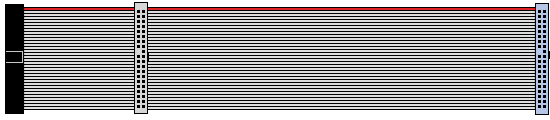
Cable select
Primeiro tens que especificar que drives e discos é que tens.
Para que isso funcione, configura o HD como "Stand Alone" e liga-o sozinho (e sem a placa PCI IDE).
Depois se funcionar então começas a estragar.
Mais ou menos.SammySam Escreveu:Azul liga na board.
Preto é no Master.
Cinza no Slave.
Atenção aos "jumpers" nos discos.

Azul pode bem ser na board mas ou outros dois é indiferente a não ser que uses cable select.
O que define master e slave são os jumpers das drives/discos.
Multiple devices on a cable
If two devices attach to a single cable, one is commonly referred to as a master and the other as a slave. The master drive generally appears first when the computer's BIOS and/or operating system enumerates available drives. On old BIOSes (486 era and older), the drives are often referred to by the BIOS as "C" for the master and "D" for the slave following the way DOS would refer to the active primary partitions on each.
If there is a single device on a cable, it should be configured as master. However, some hard drives have a special setting called single for this configuration (Western Digital, in particular). Also, depending on the hardware and software available, a single drive on a cable can work reliably even though configured as the slave drive (this configuration is most often seen when a CD ROM has a channel to itself).
Cable select
A drive setting called cable select was described as optional in ATA-1 and has come into fairly widespread use with ATA-5 and later. A drive set to "cable select" automatically configures itself as master or slave, according to its position on the cable. Cable select is controlled by pin 28. The host adapter grounds this pin; if a device sees that the pin is grounded, it becomes the master device; if it sees that pin 28 is open, the device becomes the slave device.
This setting is usually chosen by placing a jumper on the "cable select" position, usually marked CS, rather than on the "master" or "slave" position. Note, pin 28 is only used by the drive to determine its position on the cable and thus whether it's the "master" or "slave"; it isn't in any way a "drive select" pin used when the host is issuing commands so if a drive is jumpered to "master" or "slave" its position on the cable doesn't have to match the pin 28 meaning of "master" and "slave".
With the 40-wire cable it was very common to implement cable select by simply cutting the pin 28 wire between the two device connectors; putting the slave device at the end of the cable, and the master on the "middle" connector. This arrangement eventually was standardized in later versions. If there is just one device on the cable, this results in an unused "stub" of cable, which is undesirable for physical convenience and electrical reasons. The stub causes signal reflections, particularly at higher transfer rates.
When the 80-wire cable was defined for use since ATAPI5/UDMA4, the master device goes at the end of the 18-inch (460 mm) cable (black connector), the middle-slave connector is grey, the blue connector goes onto the motherboard. So, if there is only one (master) device on the cable, there is no cable "stub" to cause reflections. Also, cable select is now implemented in the slave device connector, usually simply by omitting the contact from the connector body.
Both the 40-wire and 80-wire parallel-IDE cables share the same 40-socket connector configuration.
- LuisFilipe
- Membro Diamante

- Mensagens: 1270
- Registado: Domingo Set 04, 2005 22:12
por alr_tech » Quinta Jun 26, 2008 10:59
boas
em resumo....
por aquilo que entendi...
tens dois discos....
duas opticas
uma porta IDE na Board
uma placa PCI com uma ou duas portas IDE...
o disco de arranque tem de ser sempre marcado como master, o segundo disco como slave...
ligadas na ide da board...
as opticas tens de colocar uma como master e a outra como slave, podes ligá-las a uma das portas da placa PCI.
na bios podes colocar na ordem de arranque uma das drives opticas seguida pelo disco de arranque....
Agora parece que já tens o XP instalado....
optimo, assim só tens de instalar os drivers da tua placa PCI, para que o windows reconheça as ditas, opticas....
os drivers:
tens de saber qual o fabricante e modelo
e ires ao site do respectivo e fazeres download....
no caso de uma instalação nova, tens de criar as disquetes para as controladoras, incluindo a da placa PCI-IDE,...
e introduzires uma a seguir á outra, depois de fazeres F6...
espero que agora se faça luz, neste problema...
cumps
em resumo....
por aquilo que entendi...
tens dois discos....
duas opticas
uma porta IDE na Board
uma placa PCI com uma ou duas portas IDE...
o disco de arranque tem de ser sempre marcado como master, o segundo disco como slave...
ligadas na ide da board...
as opticas tens de colocar uma como master e a outra como slave, podes ligá-las a uma das portas da placa PCI.
na bios podes colocar na ordem de arranque uma das drives opticas seguida pelo disco de arranque....
Agora parece que já tens o XP instalado....
optimo, assim só tens de instalar os drivers da tua placa PCI, para que o windows reconheça as ditas, opticas....
os drivers:
tens de saber qual o fabricante e modelo
e ires ao site do respectivo e fazeres download....
no caso de uma instalação nova, tens de criar as disquetes para as controladoras, incluindo a da placa PCI-IDE,...
e introduzires uma a seguir á outra, depois de fazeres F6...
espero que agora se faça luz, neste problema...
cumps
AMD XP 2400+, ASUS A7N8X-E Deluxe
1 Gb DDR 400, Seagate 80 GB ATA + 120 Gb ATA, ATI 9600 XT
1 Gb DDR 400, Seagate 80 GB ATA + 120 Gb ATA, ATI 9600 XT
- alr_tech
- Gurus

- Mensagens: 6768
- Registado: Quinta Fev 17, 2005 18:01
- Localização: Lisboa
22 mensagens
• Página 2 de 2 • 1, 2
Voltar para Processadores, Chipsets e Motherboards
Quem está ligado:
Utilizador a ver este Fórum: Nenhum utilizador registado e 1 visitante